Docs › Guides
GitHub, end to end
Last updated 27 October 2026 · about 30 minutes to set up
A GitHub repository and a board that keep each other honest: new issues appear as cards, an agent moves its card as it works, and when the pull request is merged and then deployed, a workflow moves the card to Merged and to Released. Nobody drags a card to say what GitHub already knows.
| Step on the board | Who moves the card |
|---|---|
| Backlog | the board, when somebody opens an issue (an automatic import) |
| Implement › Open, Implement › Done | the developer, or a coding agent through the MCP server |
| Review, Validate | people, by hand |
| Deploy › Merged | a GitHub workflow, when a pull request that closes the issue is merged |
| Deploy › Released | the same workflow, when a deploy that brings that pull request finishes well |
Everything automatic hangs on one habit: every pull request says Closes #N,
N being its issue. A card is numbered after its issue (#128), so a pull request
finds its cards through the issues it closes.
Before you start.
- You are an owner of the board (Settings › People says who is).
- You can change the repository's settings: add a secret and a workflow.
-
The deploy is a GitHub workflow of its own, whose success means "it is live". The examples
call it
Deploy(deploy.yml) and say it deploys theproductionbranch; yours may deploymain, which works the same.
Examples use the repository acme/web and its issue #128; put your
own in their place.
1 · Follow the repository
- Open the board, then Connectors in the top bar, and + Add a tracker › GitHub.
- Connect your GitHub account. GitHub asks which repositories the kanbanwall app may read: pick this one. (Already connected and the repository is not listed? add repositories on GitHub, beside the picker, installs the app on more.)
- Pick the repository.
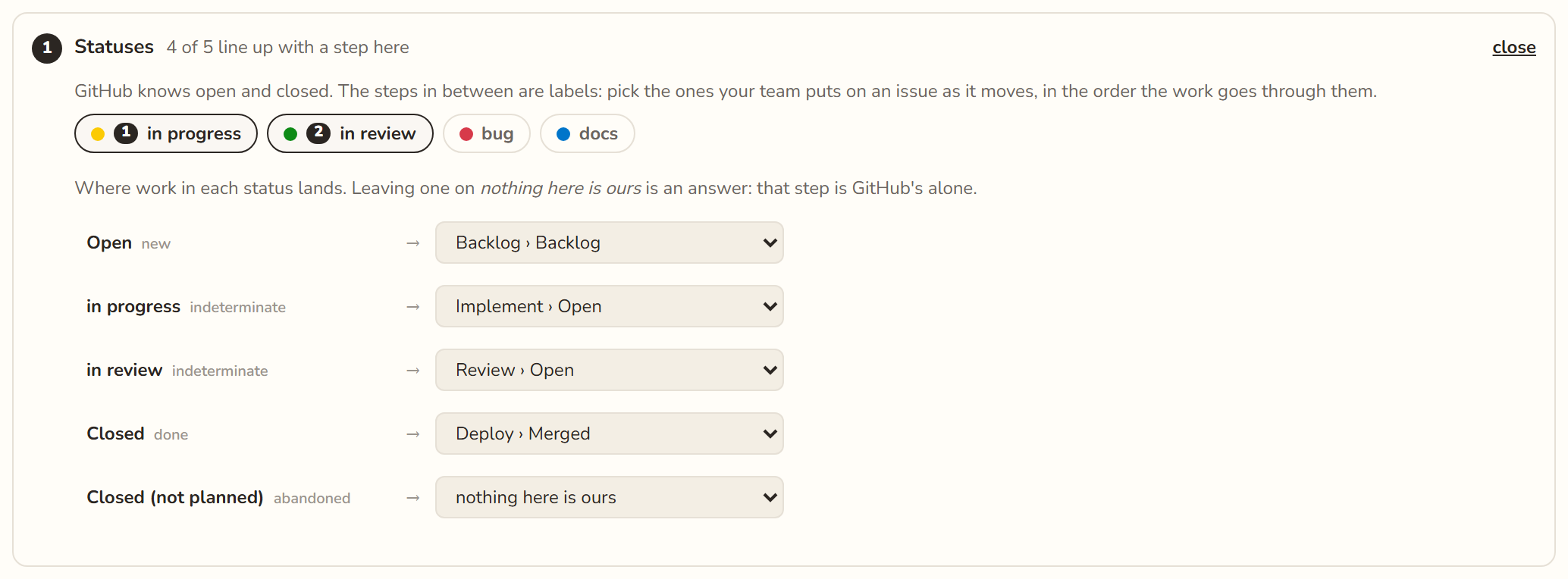
- Pick the labels your team puts on an issue as it moves, in order. GitHub knows only open and closed; the labels are the steps in between. A team that uses none picks none.
- Say where work in each status lands. The guess is usually right: Open in the Backlog, Closed where the clock stops. Closed (not planned) stays on nothing here is ours: dropped work stops no clock.
- Start following.
A board that follows one repository numbers its cards #128. A board that follows
two gives each a prefix (web#128, api#128), set on the same
card; everything below works the same with one.
2 · Decide who moves what
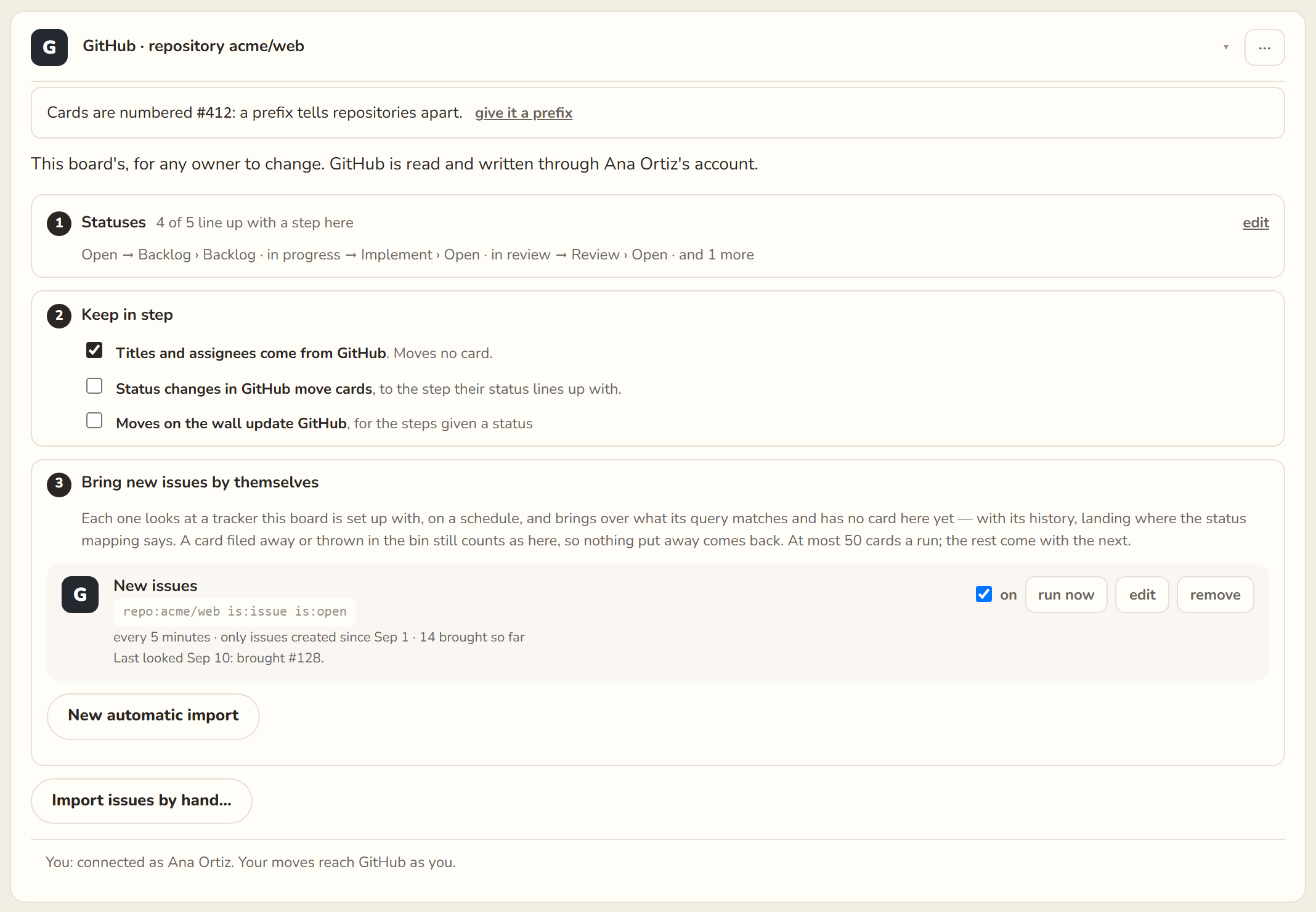
Step 2 of the tracker's card says what crosses between the board and GitHub on its own. For this setup, where a workflow moves finished work, set it like this:
| Titles and assignees come from GitHub | on. An issue renamed or assigned on GitHub is renamed, and wears its assignee's face, on the wall. It moves no card. |
| Status changes in GitHub move cards | off. Merging closes the issue, and the workflow already moves the card; a second hand moving it on "closed" pulled cards back from Released to Merged. |
| Moves on the wall update GitHub | off. GitHub closes an issue when its pull request is merged. A board that also closed it, on a move to Implement › Done, closed issues whose code was not merged yet. |
Each change saves itself, and the note at the foot of the screen says when it has. With this, every step has one hand on it.
3 · New issues by themselves
In step 3 of the same card, New automatic import: the query is the repository's open
issues (repo:acme/web is:issue is:open), every 5 minutes, and keep
only issues created from now on ticked, so it does not bring the whole backlog. Each run
brings what is new, in the step its status lands in, with whoever it is assigned to. To bring
older issues once, use Import issues by hand… on the same card.
A new issue reaches the board within the interval, so an agent asked to move a card a minute after the issue was opened may hear "no card numbered #128" — try again a little later.
4 · The agent
A coding agent can move its own card as it works. It reaches the board through the MCP server, with your key: what it does is written as yours.
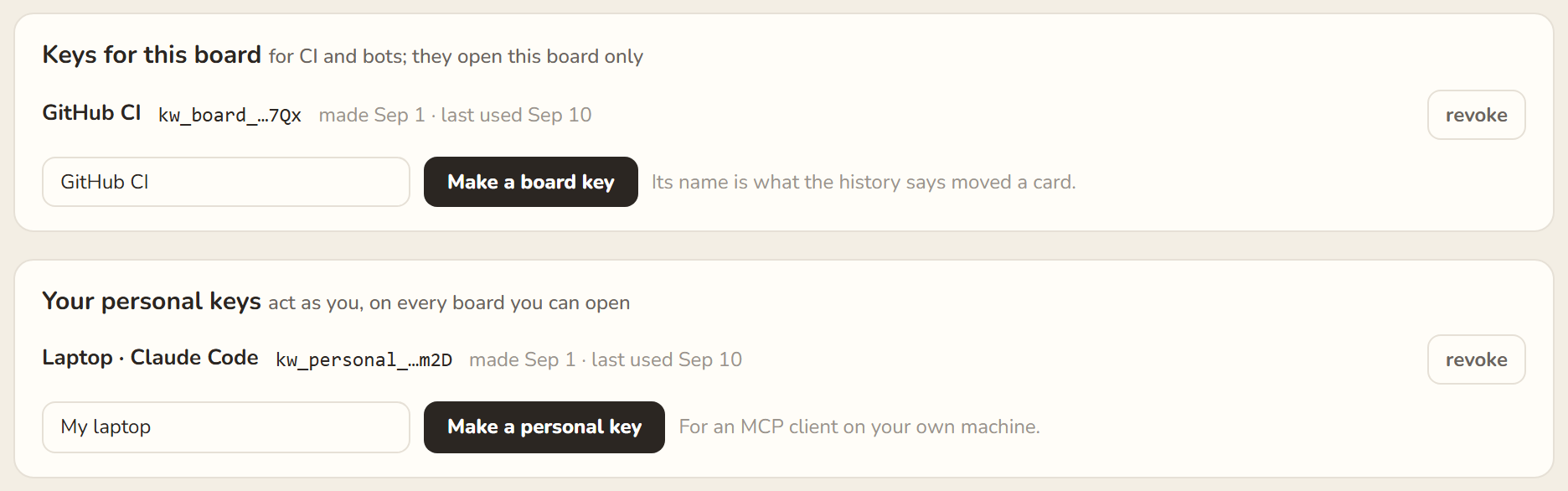
- In Settings › Agents & CI, under Your personal keys, name a key after the machine it will live on and Make a personal key. It is shown once: copy it.
-
Add the server to Claude Code for this project:
claude mcp add --transport http --scope local kanbanwall https://kanbanwall.ai/mcp \
  --header "Authorization: Bearer kw_personal_…"
--scope localkeeps it in your own settings. A key is personal, so it never goes in a.mcp.jsonthat is committed. Other clients take the block on Agents and CI. -
Tell the agent what to do with it. A few lines in the project's
CLAUDE.mddo:## The board (kanbanwall) Work is tracked on the **Acme web** board, through the `kanbanwall` MCP server. Each card is keyed `#N`, N being the GitHub issue, and worked on in a branch named `N-…`. - When you start on an issue, move its card to `Implement › Open` (`move_card`). - When the work is done and the pull request is open, move it to `Implement › Done`. - Never move cards into Review or Validate: people do that. - Never move cards to Merged or Released: `.github/workflows/kanbanwall.yml` does, from the issues each pull request closes. Keep `Closes #N` in every pull request's description. - If the kanbanwall server is not connected, say so and carry on with the work.
-
Optional, and worth it: start each issue on a branch linked to it, named after its number,
so the branch and the card name each other.
gh issue develop 128 --name 128-retry-queue --base main   # makes the branch, linked to the issue
git fetch origin && git checkout 128-retry-queue
5 · The pipeline
A workflow in the repository tells the board when a pull request is merged and when a deploy brings it to production. It comes in with a board key: a key that opens this board alone, under its own name.
The key
- In Settings › Agents & CI, under Keys for this board, name it GitHub CI and Make a board key. The name is what a card's history says moved it. Copy the key: it is shown once.
-
Save it in the repository as the secret
KANBANWALL_TOKEN, from GitHub (the repository's Settings › Secrets and variables › Actions › New repository secret) or from a terminal:gh secret set KANBANWALL_TOKEN --repo acme/web # paste the board key when asked; it is never echoed
-
Note the board's id: it is the long id in the board's address,
https://kanbanwall.ai/board/<board-id>. It is not a secret; it goes in the workflow.
The workflow
Add this as .github/workflows/kanbanwall.yml on main. Four things in
it are yours to change: the board's id, your deploy workflow's name (in
workflows:) and its file (DEPLOY_WORKFLOW), and the branch it
deploys (DEPLOY_BRANCH, and once more in the released job's
if).
# .github/workflows/kanbanwall.yml
name: kanbanwall

# Moves this repository's cards on a kanbanwall board.
#   A pull request merged into main  -> its issues' cards go to where the clock stops (Merged).
#   A deploy that finished well      -> the cards of every pull request it brought go to Released.
# A pull request finds its cards through the issues it closes: the ones GitHub links to it,
# and any "Closes #N" (or Fixes, Resolves) in its description. A card that cannot be found,
# or a pull request that closes no issue, is a warning in the run; the run never fails over it.

on:
  pull_request:
    types: [closed]
    branches: [main]                 # the branch pull requests merge into
  workflow_run:
    workflows: ["Deploy"]            # your deploy workflow's name: the `name:` at its top
    types: [completed]

# issues: read, or GitHub answers every pull request's closing issues with an empty list.
# actions: read, to find the last deploy that worked.
permissions:
  contents: read
  pull-requests: read
  issues: read
  actions: read

env:
  KANBANWALL_CI: https://kanbanwall.ai/api/boards/<board-id>/ci
  MERGE_BRANCH: main                 # the branch pull requests merge into (as in `on:` above)
  DEPLOY_WORKFLOW: deploy.yml        # your deploy workflow's file name
  DEPLOY_BRANCH: production          # the branch it deploys (main, if you deploy main)
  # The issues a pull request closes: GitHub's links, plus "Closes #N" in its description.
  CLOSES: >-
    [.closingIssuesReferences[].number]
    + [(.body // "") | scan("(?i)(?:^|[^a-z])(?:close[sd]?|fix(?:e[sd])?|resolve[sd]?) #([0-9]+)")[0] | tonumber]
    | unique | .[]

jobs:
  merged:
    if: github.event_name == 'pull_request' && github.event.pull_request.merged == true
    runs-on: ubuntu-latest
    steps:
      - name: Move the closed issues' cards to Merged
        env:
          GH_TOKEN: ${{ github.token }}
          KANBANWALL_TOKEN: ${{ secrets.KANBANWALL_TOKEN }}
          REPO: ${{ github.repository }}
          PR: ${{ github.event.pull_request.number }}
          SHA: ${{ github.event.pull_request.merge_commit_sha }}
        run: |
          issues=$(gh pr view "$PR" --repo "$REPO" --json closingIssuesReferences,body --jq "$CLOSES")
          if [ -z "$issues" ]; then
            echo "::warning::PR #$PR closes no issue, so no card moved. Put \"Closes #N\" in its description."
            exit 0
          fi
          for n in $issues; do
            jq -n --arg repo "$REPO" --argjson pr "$PR" --arg sha "$SHA" --arg n "$n" \
              '{event: "merged", repo: $repo, pr: $pr, sha: $sha,
                message: ("Closes #" + $n), id: ($repo + "-merged-" + $n + "-pr" + ($pr|tostring))}' |
            curl -sS -X POST "$KANBANWALL_CI" \
              -H "Authorization: Bearer $KANBANWALL_TOKEN" \
              -H "Content-Type: application/json" --data-binary @- > answer.json || true
            echo "#$n: $(cat answer.json)"
            jq -e '.ok == true' answer.json > /dev/null ||
              echo "::warning::#$n not moved to Merged: $(jq -r '.message // "no answer"' answer.json 2>/dev/null)"
          done

  released:
    # The branch is written out here: a job's `if` cannot read `env`.
    if: >-
      github.event_name == 'workflow_run'
      && github.event.workflow_run.conclusion == 'success'
      && github.event.workflow_run.head_branch == 'production'
    runs-on: ubuntu-latest
    steps:
      - name: Move the deployed issues' cards to Released
        env:
          GH_TOKEN: ${{ github.token }}
          KANBANWALL_TOKEN: ${{ secrets.KANBANWALL_TOKEN }}
          REPO: ${{ github.repository }}
          RUN_ID: ${{ github.event.workflow_run.id }}
          AFTER: ${{ github.event.workflow_run.head_sha }}
        run: |
          # What production ran before this deploy: the last earlier deploy that finished well.
          # Picked here from the newest runs, never with the API's status=success filter,
          # which can answer with runs from months ago first.
          BEFORE=$(gh api "repos/$REPO/actions/workflows/$DEPLOY_WORKFLOW/runs?per_page=50" \
                     --jq "(.workflow_runs[] | select(.id == $RUN_ID) | .created_at) as \$now
                           | [.workflow_runs[] | select(.head_branch == \"$DEPLOY_BRANCH\"
                               and .conclusion == \"success\" and .created_at < \$now)]
                           | sort_by(.created_at) | last | .head_sha // empty")
          if [ -z "$BEFORE" ]; then
            echo "::notice::No earlier deploy that worked to compare with; no card moved."
            exit 0
          fi
          if [ "$BEFORE" = "$AFTER" ]; then
            echo "::notice::The same commit was deployed again; nothing new is released."
            exit 0
          fi
          # The release box these cards go into: the tag on the deployed commit, or else its date and
          # commit. A re-run names the same box, so nothing is made twice.
          VERSION=$(gh api "repos/$REPO/tags?per_page=100" --jq ".[] | select(.commit.sha == \"$AFTER\") | .name" | head -n 1)
          [ -n "$VERSION" ] || VERSION="$(gh api "repos/$REPO/commits/$AFTER" --jq '.commit.committer.date[0:10]') ${AFTER:0:7}"
          # The pull requests this deploy brings: the ones merged into main that each new commit
          # belongs to. Works for merge commits, squash and rebase merges alike, and leaves out a
          # pull request that promotes main to production.
          prs=$(gh api --paginate "repos/$REPO/compare/$BEFORE...$AFTER" --jq '.commits[].sha' |
                while read -r sha; do
                  gh api "repos/$REPO/commits/$sha/pulls" \
                    --jq ".[] | select(.merged_at != null and .base.ref == \"$MERGE_BRANCH\") | .number"
                done | sort -un)
          if [ -z "$prs" ]; then
            echo "::notice::This deploy brings no merged pull request."
            exit 0
          fi
          for pr in $prs; do
            issues=$(gh pr view "$pr" --repo "$REPO" --json closingIssuesReferences,body --jq "$CLOSES")
            if [ -z "$issues" ]; then
              echo "::warning::PR #$pr closes no issue, so no card moved to Released."
              continue
            fi
            for n in $issues; do
              jq -n --arg repo "$REPO" --argjson pr "$pr" --arg sha "$AFTER" --arg n "$n" --arg version "$VERSION" \
                '{event: "deployed", repo: $repo, pr: $pr, sha: $sha, version: $version,
                  message: ("Closes #" + $n), id: ($repo + "-deployed-" + $n + "-pr" + ($pr|tostring))}' |
              curl -sS -X POST "$KANBANWALL_CI" \
                -H "Authorization: Bearer $KANBANWALL_TOKEN" \
                -H "Content-Type: application/json" --data-binary @- > answer.json || true
              echo "#$n (PR #$pr): $(cat answer.json)"
              jq -e '.ok == true' answer.json > /dev/null ||
                echo "::warning::#$n not moved to Released: $(jq -r '.message // "no answer"' answer.json 2>/dev/null)"
            done
          done
What it does:
-
merged runs when a pull request into
mainis merged. It collects the issues the pull request closes, from GitHub's own links and fromCloses,FixesorResolves #Nin its description, and sends onemergedevent for each. The card goes to where the board's clock stops, so its cycle time ends at the merge. -
released runs when the deploy workflow finishes, and only if it succeeded. It
finds what the last good deploy ran, lists the pull requests merged into
mainsince, and sends adeployedevent for every issue they close. Those cards go to the released step, together in a release box named after the deploy: the tag on the deployed commit (v2.15.0), or else its date and commit (2026-10-08 a1b2c3d). The first card makes the box. A failed deploy moves nothing; its pull requests are released by the next deploy that works. -
Each event carries an
id, so a re-run of the same workflow moves nothing twice. A card that cannot be found, or a pull request that closes no issue, is a warning in the run's log, and the run stays green.
The board's own GitHub repository is how Closes #128 becomes card
#128 (or web#128 with a prefix): the workflow never needs to know
the prefix. The full rules are in the API reference.
workflow_run runs from the default branch. The released job
only works once the file is on main, so it cannot be tried from a branch.
6 · Try it
-
By hand, first. Write a card to try on (+ New card, numbered
#9999, put in Implement), and send the event the workflow would:curl -sS -X POST https://kanbanwall.ai/api/boards/<board-id>/ci \ -H "Authorization: Bearer kw_board_…" \ -H "Content-Type: application/json" \ -d '{"event":"merged","repo":"acme/web","message":"Closes #9999","id":"try-9999"}'The card moves to Merged, and the answer says where:{ "ok": true, "message": null, "data": { "key": "#9999", "stage": "Deploy › Merged", … } }Send it again: the sameidmoves nothing. Then throw the card away (Del). -
A real merge. Merge a pull request whose description says
Closes #N. The run of the kanbanwall workflow for it prints one line per card:#128: {"ok":true,"message":null,"data":{"key":"#128","stage":"Deploy › Merged",…}} Warning: PR #131 closes no issue, so no card moved. Put "Closes #N" in its description.and the card's history says it moved to Deploy › Merged, and that GitHub CI moved it. -
A real deploy. While the deploy runs, the card does not move. When it finishes with
success, the
releasedjob runs and the card goes to Released.
Day to day
- An issue is opened on GitHub; within minutes its card is in the Backlog.
-
Somebody takes it:
gh issue develop N, and the card to Implement › Open (the agent does it, if it is the agent's). -
The pull request is opened with
Closes #N, and whoever opened it (or the agent) moves the card to Implement › Done. - People review and validate, moving the card through Review and Validate.
- Merged: the workflow moves the card to Merged, and GitHub closes the issue.
- Deployed: when the deploy finishes well, the workflow moves it to Released.
When something goes wrong
- The run is green and nothing moved. Read its log: the warnings say why — the pull request closes no issue, or no card on the wall carries that number.
-
A pull request closes the wrong issues. GitHub links any "fixes #12" or "closes #94"
it finds in a description, even inside an example, and merging closes them. Check what it
links after opening it:
gh pr view 131 --json closingIssuesReferences --jq '.closingIssuesReferences[].number'
-
Every pull request "closes no issue". The workflow has lost
issues: read: without it GitHub answers every pull request's closing issues with an empty list. -
Released never happens. The name in
workflows:must be the deploy workflow'sname:, exactly; the branch in thereleasedjob'sifmust be the branch it deploys; and the file must be onmain. - Cards move back after Released. Something else moves them on GitHub's word: switch off Status changes in GitHub move cards (step 2), or leave Closed on nothing here is ours.
- Issues close before their code is merged. Switch off Moves on the wall update GitHub (step 2): GitHub closes them itself, at the merge.
- "No card numbered #128". The issue is newer than the last automatic import: wait for the next one, or run now on the job (step 3).